The screens of silence

I am wondering whether the title of this post should be “The screams of silence” because that’s how it feels some days.

It’s week four of emergency distance learning and I am feeling weaker for it. Is anyone else feeling this way from staring at their screen(s) all day? If asked, I’ve been responding with thumbs up and all good, but in reality I am fighting the dissonance disrupting my days, and it relates to the way I feel about what is happening in education right now. To top it off, I am wrestling with self-doubt about whether my instructional act is all together. Add to that the pressure I’m putting on myself to wake up feeling fit and fresh because I am working from the “comfort” of my basement. Being cooped up, I mean observing physical distancing, doesn’t help. See what I mean about interchangeable titles?

Then there is the daily media segment about something or another to do with #QuarantineEducation. This week an article in The Globe and Mail shared Some overwhelmed parents are giving up on distance learning and abandoning at-home schooling. This noise is hard to tune out when we have been asked to stay in place and create something that has never been done effectively on a large scale so quickly. Maybe that’s what is holding my head hostage? Or maybe it’s that my hair is too long? Both make me want to scream sometimes

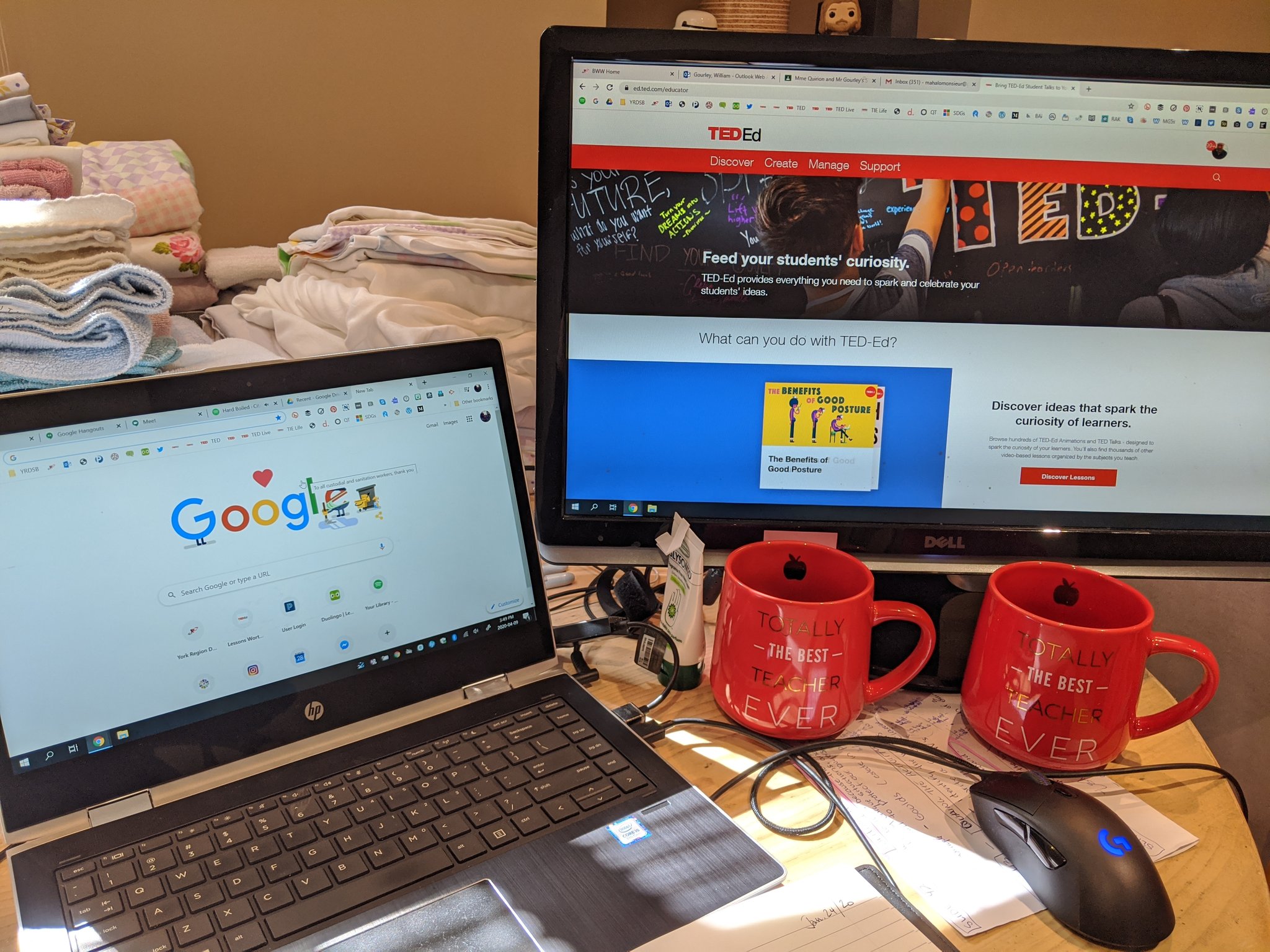
There is something to be said about the experience of facilitating learning in the vacuum of 2020. It’s cold. As I stare at several connected screens to keeping track of at least 17 other currently opened tabs on my computer, I have to admit this is all a bit daunting – even for this tech-happy educator. If teaching is my superpower, then the screens, meetings, and other digital dungeons trying to contain me have become my kryptonite.

I share this neither in angst nor anger, but out of an admission that the struggle is a real one. It sounds like I am not alone. This surreal situation we are now in was, is, and will never be a positive experience. We were starting to recover from a devasting January and dreadful February only then to be steamrolled by March when an uncontrollable virus unleashed itself on the world. Welcome April, a month that no one would have predicted to be the first of two months away from our schools…so far.

What did we do? We rallied, we pivoted to support our students and each other, and we waited patiently knowing we had to care for our own families too. We were lucky that the start of March Break landed when it did, as it may have helped us to avoid something worse had COVID 19 entered our open schools. Throughout this time we turned to our screens to watch for updates, data, and directions.

While we waited and watched for answers, our thoughts continued to race and the questions began to bubble up. How am I going to reach my learners? How are students who are marginalized by poverty and or other circumstances coping with all of this? What are the expectations from my board, admin, families, and most importantly students? What about my life at home? How will I manage when many of my teaching resources are at school? How much work do I assign? How about due dates? Do I take attendance? What happens when students don’t complete work? How do I assess anything without fear that someone else has done the work?

Everybody was working together. As our profession embraced the challenge of this reality, digital resources were curated, virtual meetings were held, contact was reinitiated with families/students, and a sense of temporary normalcy had made its way back into our weekly M to F routines. Cue some new silences.

The enthusiasm of returning to instruction, albeit asynchronously, signified that something was being done on behalf of families and our students, but the lack of connection through voice and vision has been hard to overcome for this educator. Speaking with many other educators who are feeling the same way, it is the meaningful interactions with peers/teachers and the chance of being heard that students are craving the most right now. We need to make sure they are acknowledged and heard, and the current situation is leaving them without a voice.

Teachers are the conduits for connection in their classrooms and will never be replaced by an emoji, meme, or brief feedback on a task to be viewed in silence on a student’s screen. However, it has been difficult to connect with students due security issues relating to conferencing platforms such as Google Meet and Zoom. This is extremely frustrating for a number of reasons. With those screens dark, students are left to keyboard strokes, Screencastify, and digital classroom posts for their content and updates. This is not the education any of us signed up to deliver. Despite my efforts to adapt and fill my screens with amazing shareable content to carry on, something is missing. The voices of my students. Cue the disconnects. Cue the silent screams at silent screens.

When All of This Is Over….Remember The Number of Students Who Couldn’t Access Technology

I know I am supposed to be embracing technology and getting pumped for all the new applications and tools that I am learning how to use. I have been completely in awe of how fast Ontario teachers adapted to this new reality and created engaging learning opportunities on many different platforms for their students. However, I am facing a problem that many of the students in Ontario are currently challenged with. We are both having difficulty accessing reliable technology and the internet.

Last year, I bought a laptop and have had nothing but problems over the past couple of weeks. It has crashed multiple times, has had problems with the speaker and generally just caused me a lot of frustration. I have had to apologize to colleagues and students when our Google Meet has crashed mid sentence because of my laptop. However, I also have a tablet and a phone as emergency backup for continuing my student’s learning and connecting online with my colleagues. Many of the students in my class, school and around the province do not have the same access to technology in their home.

The thing that will stick with me from this time that we are learning from home is the number of students that required technology to complete school work. In my board alone, over 14, 500 students required technology and 2000 required internet to engage in any form of learning at home. That is an absolutely staggering number. In my classroom and my school, 20% of all students requested technology to be delivered because they didn’t have enough technology in their home to support their learning needs.

I think back now about how many messages I have sent through Google Classrooms, or assignments that have been more easily completed with internet and a computer that I have assigned. I realize how disadvantaged some of my students were every time they left the classroom and were starting behind their fellow classmates. I also think of schools where that same number was under 5% or over 50% and how monetary situations are impacting the student’s ability to access the same tools and resources required to be successful at school.

There is no doubt that students need to be confident in using technology in their daily life for many different purposes. Technology will most likely play a fundamental role in acquiring or maintaining employment as students become adults. Technology is also the primary way that many students communicate with each other. I see many of my fantastic colleagues teaching amazing lessons with the limited resources available to them to build the skills the students require. However, there is a major gap that exists between students that can go home and practice the skills regularly and those that rely on limited and sometimes broken school technology.

I am fortunate that I teach at a middle school. Working with the students there keeps me current and up to date on trends and innovations in technology. But over the last month, I have been thinking about those amazing grade eight students in my knitting club and those who assist my students with such kindness. Did they fall in the 20% at my school? If so, will they have any chance at being successful in e-learning courses in high school?


Online learning for students with DD

When much of the discussion about on-line learning happened in the media this year during the high school contract negotiations, I often thought My students should never have to participate in any course online. My students all have developmental disabilities and are working towards goals on an alternative IEP. Most have some form of communication impairment and are not able to read well enough to follow instructions online. Online learning seemed like something that would never work for my students! Little did I know when 2020 hit, we would have no choice but to figure out online learning the best we could. It has been very tricky, with some successes and some challenges. Here is what has worked:

  1. Sending a PDF file instead of logging on a pre-existing platform. My students are unable to sign onto a device or navigate difficult platforms.  My team sends home a PDF file every Monday with activities, songs and pictures for that week. The PDF has pictures that link to the activity for the student. It is simple, straight forward and allows families to work at their own pace. Since it is a PDF, families have had no trouble opening the file on phones, tablets, iPads, Chromebook or laptops.

2) Having regular parent contact. I contacted all my parents by phone the first week we started the online learning and I end every e-mail, assignment and weekly newsletter with how they can contact me. Spending a lot of time answering parent e-mails and reaching out via phone has alleviated a lot of stress and anxiety.

3) Sending students mail. Who out there doesn’t love to get mail? For my families that have decided not to access the online component of the learning, a letter in the mail continues to tell them that we are thinking of them and offers them another reminder how they can reach out. Did you know that Canada post will deliver pre-stamped envelops to your house? It took about a week to receive our envelops and we were so happy that no one had to leave their house to buy them!

4) Video conferencing with the class and with individual students. My local has worked closely with the board to make some specific platforms available for meeting with students online. When I am meeting with a student and their family, I take another staff member with me on all calls. Usually, it is one of the TAs from my class that my student knows very well. For my students who are incredibly socially motivated and have difficulty reading or communicating, seeing each other has been very important for their emotional well being. I keep it short and control the conversation. Only about half of my families wanted to do this option but the students that have participated, have loved it!!


5) Sharing pictures from class. At the end of every weekly file is a section called connecting. I have included pictures from school and also some parents have submitted some pictures from things that they are doing at home! Many parents have told me that the pictures have been very helpful for their child and they have enjoyed looking at them.


Classrooms After Covid-19

ETFO’s position on in-person learning remains unchanged. The union firmly believes that the daily, in-person model of instruction and support best meets the educational, developmental and social needs of students, provides the best experience for support, and is the most equitable learning model for all students. ETFO’s expectation is that elementary virtual learning in any capacity, including through hybrid models of instruction, will end once the pandemic ends.

I write this blog in response to the Province of Quebec opening their public schools as of May 11th 2020. As the education of students is challenged with many layers of complexity, I will muse about what classrooms might look like when Ontario’s students return to classroom.

Managing the Spread of the Virus

In minimizing the spread of the virus, schools may be given the responsibility of monitoring students’ level of health. This could mean morning temperature checks, hourly hand washing routines, hand sanitizer stations, and the wearing of masks. Custodians would also be tasked with cleaning areas frequented my students such as hallways and washrooms. This would mean more custodians may need to be hired to keep up with increased hygiene demands.

Further, policy might have to be put in place to send students home who are experiencing signs of Illness. As a classroom teacher, I know that parents send their children to school with diarrhea, vomiting, and fever which is likely to spread infection to others. I am concerned about the occurrence of students’ 11 o’clock fever which results in parent dosing their feverish child with Tylenol at 7 am only to have the fever return when the medication wears off 4 hours later. In 2009, when the H1N1 virus hit, one of my grade 7 classes had 18 students sick with H1N1 after a birthday party. From my students, I contracted H1N1 and was fortunately put on antiviral medication, so I recovered within a few days.

In considering teachers already being tasked with many responsibilities and challenges, I suggest that the responsibility of monitoring students’ health be placed in the capable hands of trained medical professionals. This would mean that boards of education would have to hire health professionals such as practical nurses to monitor students’ health and deal with students first aid needs.

Hallways, Entry, Exit, Busing, Recess, Assemblies

In order to limit traffic and honour social distancing, schools may have to set zones, based on students’ age, to limit contact between grade level divisions. This might mean that students in Kindergarten, primary (grades 1, 2, 3), junior (grades 4, 5, 6), and intermediate (grades 6, 7, 8) will have limited access to different hallways and staircases in order to limit numbers of students interacting.

Further, limiting numbers of students interacting may mean staggered entries and dismissals with each grade division having its own entry and dismissal time.

The number of school buses would have to increase to ensure seating to accommodate social distancing for students riding to and from school (i.e. one child per seat).

Students would have to stay in their classrooms to eat lunch and they would also have staggered recess times to limit contact between students of different ages and the number of students outside for recess at the same time.

Assemblies would be cancelled until the chance of spreading the viral infection was limited. Physical Education classes might have to be limited in size of 15 students only and often held outside to limit the spread of the virus.

Classroom Configurations

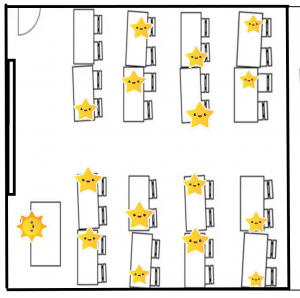
Classrooms will have to be set up very differently than they are now as flexible seating and collaborative work will not measure up to the requirements of social distancing. This means that students will be sitting in rows 2 metres apart. Students will not be permitted to get out of their seats to talk to their peers or to wander around the classroom. Classrooms will be much like my grade 5 classroom with all students sitting in rows, doing work with classroom instruction on the board.

Younger students may also have to sit separately during carpet time in their marked spot (while teaching grade 2/3, I used tape to indicate where certain students had to sit).

Connected Collaborative Classrooms

In order to engage in classroom collaboration, students, grades 4 and up, will require computers to work to complete classroom assignments and work collaboratively with other students via online classroom applications.

Class Sizes and Staffing

The Province of Quebec indicated that they would limit class sizes to 15 students. This will present a problem for many boards of education as they simply do not have enough schools and classrooms to accommodate these much smaller class sizes. Further, Kindergarten classrooms usually have up to 30 students in each classroom. In accommodating smaller class sizes, students might have to have staggered use of their classroom with half the class coming to school in the morning and the other half coming to school in the afternoon. Or instead, school boards would have to locate twice the classrooms to accommodate all Kindergarten students.

With smaller class sizes, means hiring more teachers. With class size at about 25 students average per class there will have to be 1.1 more teachers for every two classes currently (25 X 2 = 50 /15 = 1.1). If you have been involved in staffing schools, you will know teacher allocations are usually about percentages as there is usually a teacher in a school with a percentage of a whole teaching job e.g. 0.4 = 40% of time and pay of a whole teacher.

In using the numbers for an elementary school, Kindergarten to grade 8, staffing numbers could change as follows for just classroom teachers not including planning time teachers (i.e. Music, Physical Education, Health, Art, Drama, Planning Time):

Students

Current Staffing

Covid-19 Staffing

Primary Division

270

15

18

Junior/Intermediate Division

300

13.5

22

Total

600

28.5

40

In this scenario, there would be a 42% increase in teachers needed to teach smaller classes.

In cutting class sizes to accommodate physical distancing, there could be an over 40% increase in teaching staff as demonstrated above.

Limiting People with Compromise Health

Further, the Province of Quebec is suggesting that teachers over 60 years or with compromised health challenges work remotely from home. Students with compromised health challenges would also be recommended to stay home thus having them continue their online learning.

Dealing with Mental Health

This is a challenging time for all people; students and educators would require more mental health supports available on site within schools. With the stress of social distancing and more structured changes in learning, many students may not be able to cope.

Violence in schools has already been well documented as a significant concern and with more stress in schools, students will have even more challenges in regulating their emotions. Schools will need mental health professionals, more teaching assistants, and more social workers to support these students who are already at risk.

The Bottom Line for People

In the end, with all this planning and adapting of the educational landscape, parents may choose to keep their children at home. As a parent, I know that children are great spreaders of infection. I have personally missed three Christmas celebrations as my young children got sick at the time and then passed the infection on to me. I believe that viruses and bacteria strengthen in young children only to hit their parents like a tsunami – I have pictures on me lying on the floor while my kids open up their presents! Fortunately my children are adults now.

Governments should be cautious in their advocacy for reopening schools as they put staff, students, and the school community at risk of getting sick or very sick, suffering life changing consequences. Be reminded the Infection Prevention and Control is a significant health and safety concern in all workplaces.

Wishing you, your family and friends best health,

Deb Weston

Resources & Recent News Articles

Coronavirus disease (COVID-19) technical guidance: Guidance for schools, workplaces & institutions World Health Organization

COVID-19 Emergency Preparedness and Response WASH and Infection Prevention and Control Measures in Schools Unicef

COVID-19 Guidance: Occupational Health and Safety and Infection Prevention & Control

COVID-19 in Quebec: Some businesses will reopen in May, but no return to ‘normal life,’ says premier

How other countries sent their children back to school amid COVID-19

How will schools enforce physical distancing Your COVID-19 questions answered

May opening of elementary schools, daycares ‘a necessary decision,’ says Quebec education minister

No plan to reopen B.C. schools yet, says education minister

What will Canadian schools look like after COVID-19? Here’s what could change

So you’re teaching from home. How’s your back?

Ouch! Each time that the government extends public school closures because of COVID 19, it hurts more and more. Although, concerns for the safety of our families at home and school are top of mind, it really hurts to be away from students, staff, and the frenetic spaces we normally occupy. It hurts wondering if they are okay or if they are struggling to cope with the turmoil and uncertainty wreaking havoc on our lives.

Well at least we are teaching and reconnecting with our learners again, but as I gaze at my screens, I feel the tension across my shoulders. As my eyes dart about, my ability to focus on digital content for extended periods of time becomes difficult. I feel my body rebelling against its natural urges to move about, write something on the board, and make eye contact. This pain hits the mind and body and I’m not sure which is worse. Ouch!

I am finding that my increased time in front of screens rather than my students is taking a toll on my body and mind that is different than face to face instruction. For one thing, I am sitting more, corresponding via email more, joining virtual meetings more, and aiming my eyes towards my screens more. If you are like me, you might have a work space at home that gets used on evenings and weekends. I use an old kitchen table and chair*. This space, which is normally only used for an extra hour or three each day, has now become my classroom and office for as many as 6 to 8 hours per day. Between the planning, prepping, office hours, and meetings the hours add up. By the end of the day, I feel it.

I never realized that my workspace would be the reason why I have been waking up with an aching neck and back after the daily grind of extended screen time – my spartan set-up has me sore, stiff, and in need of a stretch. I have already flattened 2 couch cushions beyond their intended shape. Decorating aside, this got me thinking about how other students and educators must be dealing with their non-traditional work/learning spaces in a time of physical distancing and social isolation.

I have seen pictures of students at kitchen tables that are just below shoulder height. I have heard of families, all working from home, having to negotiate work spaces between bedrooms, living rooms, and kitchens. All flat surfaces have been claimed by computers and books. TV trays are now doubling as desks, while bedrooms have become bastions for team meetings even though I have yet to be on a conference call when a child or pet doesn’t magically appear to add a little levity.

At my house it is 3 generations on 3 floors and even with all of that space, there are still moments that require the utmost patience and grace. I can only imagine what it must be like for families in apartments or condos with limited space where a comfy couch has become a conference space instead of a family refuge? I am also learning that not everyone has a place to escape to when things get crunchy.

The increased time spent in a non-traditional work space trying to do make traditional work happen despite non-traditional circumstances is new to all of us. So, it comes as no surprise that my new classroom hub was not capable of supporting me physically over longer periods of time. Knowing that continuing without making some adjustments was going to end up poorly, I made some adjustments. Here’s a quick list of things I added to help:

  1. Take movement breaks (stretch, exercise, elevate your heart rate).
  2. Hydrate (coffee/tea does not count, water works best).
  3. Take your eyes of screens. Think of the 20/20/20 rule.
  4. Adjust workspace heights. Consider adding a box to your laptop to make a standing desk.
  5. Take a break when you are tired. Call it strategic surrender.

Hopefully, these 5 things can help you to lessen or avoid the physical fatigue that we are experiencing. With so much more happening, I wanted to share some ways on how we can make emergency distance learning less stressful on our bodies. As we face at least 4 more weeks of emergency distance instruction ahead, it will be important for all of us to pay attention to our work at home ergonomics to be at our physical, mental, and intellectual bests.

If you have a story to share about you have adapted your home into a workspace, please share. Stay safe. Stay strong. Stay healthy.

Additional reading:

https://www.fastcompany.com/90480052/how-to-perfect-your-home-work-set-up-so-your-back-stops-hurting-so-much

Some solid information that is easy to digest about ergonomics for students(slide23)

*The table has been in my family for over 40 years and has math work(my sons and my own) pencilled into the soft pine as a inter-generational reminder of many lessons learnt and shared over the years.

Jamboard – a Tool for Learning Together at a Distance

One thing that I love about working in the classroom with students is collaborative learning. When a student has an “ah-ha” moment and blurts it out and another connects what is said to something else, that’s when the learning gets even more exciting. These are the moments that can’t quite be captured when we are learning, somewhat in isolation. 

What I call, “Distance Learning”, is something new for all of us. Early on, I realized just how much we rely on each other in the classroom. From being able to scan faces for the need to clarify; to asking questions to check for understanding and pushing forward to extend learning, when working together in the classroom, we’re able to gauge so much more and tailor the learning to meet diverse needs. Tasks that we used to work on collaboratively can’t be done in the same way and I’ve been on the hunt for ways to bring back the spirit of collaboration to the learning we are now doing at a distance. One tool that I have found myself using more and more with students, is Jamboard

In essence, Jamboard is a collaborative whiteboard that has sharing permissions that are the same as other Google Suite for Education tools. You don’t need an actual Jamboard to use the online or app version which is fantastic because there is no additional hardware required! In Jamboard, groups can collaborate in real-time to add pictures, text, or sticky notes to a canvas. 

In my last post, I mentioned that in small groups, I have been connecting with students using Google Meet, 3 times a week. While we don’t use the video feature, it’s nice to be able to hear each other as we work through a problem or on a lesson. During these Meets, our “classroom”  has used Jamboard in the following ways:

  • Check-ins: On one of our Meets, when first learning to use Jamboard, we decided that it could be a cool way to check-in with each other. Students were asked to add an image that represented how they were feeling and to use a sticky note to describe how the image related to them and their feeling. Once finished, students were allowed to share what they selected – if they wanted – and we had a discussion that was clearly enhanced by the visuals that students added to the canvas. In one of the groups, there was a student who was feeling down and it was so kind of another student to add a message of encouragement near their work, which prompted a few others to follow suit. The student was so pleased to know that they had this support system even though we were far away. They thanked their peers for their kind words.  I loved that the students who added positive messages didn’t add their names but truly just wanted to send their support. 
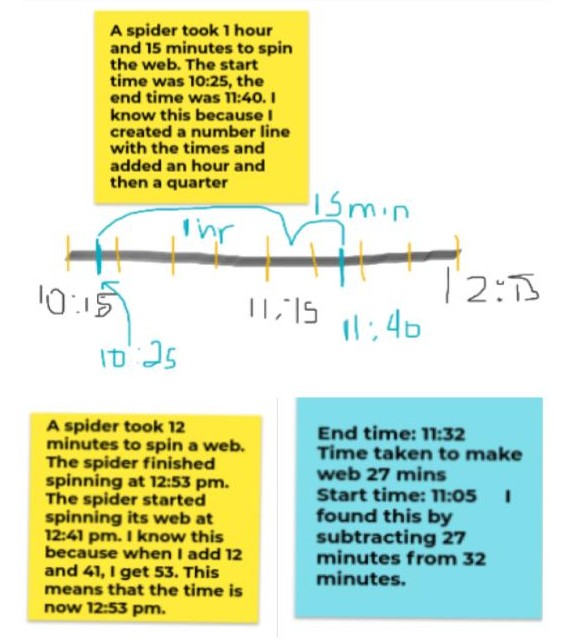
  • Math Problems: Many of the problems that we solve in the classroom have been group tasks. Students are often asked to think about a problem and think about what they can bring to the group to solve it. From there, they collaborate – putting their ideas together – to come up with a solution. Over the past couple of weeks, I’ve tried to see how best we can share our strategies for problem solving, particularly in Math. A couple of weeks ago, students were given a problem to solve, and then during our Meet, it was their chance to walk their peers through their solution. It was really helpful for students to see that our problem could be solved in a variety of ways. We were looking at elapsed time and our problem was: A spider took _____ minutes to spin a web. The spider finished at ___:___. What time did they start? Below you will find 3 different ways that students solved the problem. 

  • Once again, having the visual as students walked through the different ways that they solved the problem was so helpful. Some even added more frames to the jam to walk peers through their solutions more clearly.  It was nice hearing, “That’s an easier way to solve it” or “Oh, you can use a number line for time?”. Once again, it allowed us to learn collaboratively from and with each other. 
  • This week, we did a KWL chart to start our unit on fractions. Students added to the first two columns – What do you KNOW? and What do you WANT to know?. As they were sharing their ideas, aloud and on sticky notes, it gave others in the group ideas of what else they might add. As a group we realized just how much we already knew and look forward to the learning for this unit.  As it progresses, students will add their learning in the 3rd column.
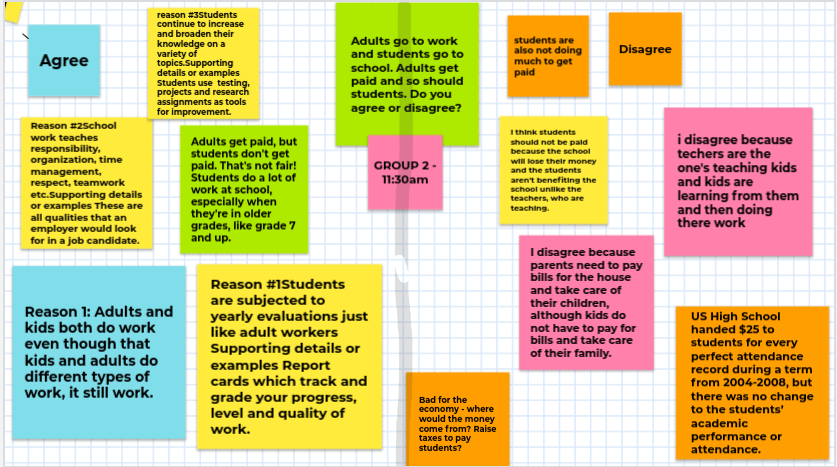
  • Language: We have been working on persuasive writing and students have been trying to convince people about whether or not students should get paid for going to school. We used a jam to capture our opinions in groups as we worked to fill in a graphic organizer. They started off by thinking about and filling in their opinion in yellow on the graphic organizer. After our Meet, they were able to get the other side’s opinion and they added those ideas to the pink side of the graphic organizer. We had plenty of arguments – and a few heated debates – on both sides which was great because it’s important to think of both sides of the argument when trying to persuade someone effectively.  Students always have access to the jam so they can refer back to it as needed. 

I know that this type of learning will never compare to the learning that happens in classrooms but as we try to learn at a distance, tools like Jamboard that help to keep the collaboration going, are so important. I know that there are so many other tools that educators are using, please feel free to share them in the comments below. I’m always happy to incorporate a new tool when it enhances student learning.

Distance Learning – Trying to Get Back Into a Routine

It’s week 4 of what I have been calling, “Distance Learning”. I can’t believe the time has been going so quickly and yet it feels as though we haven’t been in the classroom in what seems like forever. I write this post from my “classroom” in the basement and will use it as a reflection of my time management in teaching over the weeks since the March Break.

I have to admit that I started out this journey very hesitant but willing to give it my all. Knowing that this was something totally new, I knew that there were going to be things that failed epically – like my Kahoot – and that scared me. Not because I fear failure, but rather because I was most fearful of failing my students and their families. With direction seeming to come from all angles, I decided that my start would have to be with something that would work for me and my students. Early on, I realized that there is no one, cookie-cutter way of making “Distance Learning” work and that it would look different in each “classroom” and possible for every student within that “classroom”. With this in mind, I started to take what I could from the suggestions offered and left the rest on a list of what I call “Maybes”. 

Routine has always been a big part of my life. If you look at my Google Calendar, every little detail is added and if it hasn’t been added, chances are, I won’t remember it until it’s too late. This pandemic threw my whole routine out the window. My sleep was off as I worried about meeting needs, all while worrying about being sick. I found myself online all the time with multiple devices giving me notifications so that I wouldn’t miss anything. After about a week of this, I knew I wouldn’t be able to sustain things long-term. I always talk to my students and their families about balance and during week 1, I was definitely not practicing what I was preaching. Something had to give.

I knew that I had to get back to what I know works – planning out a schedule and getting back to my routine. I was already doing this for students in our weekly planner using this template, but I needed to come up with my own weekly planner. So starting on the Monday of week 2, I came up with the following plan:

  • On Mondays, I plan for the following week while checking in with students online in Google Classroom and through email. I usually post a question asking students how they are and from there can gauge whether or not I need to do a phone check-in with some. Now, I’m not doing this at all hours of the day.  I get up, get ready, and head to “my classroom” for around 8 am to begin most days.  I’m online until about 4, taking a break for lunch and a workout. 
  • On Tuesdays and Wednesdays, I meet with students in small groups on Google Meet from about 10 am until 2 pm, with feedback happening before and after. During our Meets, we do a planned lesson or activity together and use it as an opportunity to check-in on the work that we have been doing. It’s definitely different not seeing student’s faces but hearing their voices and sharing our learning has been a big motivator during this time. 
  • On Thursdays, I head back into “my classroom” and record short videos to accompany each of the lessons for the following week. I also reflect on what I have planned in order to determine whether or not the lessons are relevant based on where students are at. I also upload everything into Google Classroom for the following week and often have a division meeting that I choose to attend. 
  • On Fridays, it’s catching up on feedback and I have Meets with students at the same times as Tuesdays and Wednesdays. Last week, we tried our first whole class Meet and while it was fun, I felt as though it was so different from us all being together in the classroom. The awkward silence as someone waits to share or figuring out how to jump in to speak without interrupting someone else. We’re working on it and I hope that we have more of these times together because there is great learning happening through these challenges. 

So far, this is what has been working for me. I’m finding my balance and trying to define clear boundaries between work and home. It hasn’t been easy but I’m getting there. I would love to know how things are going for you. If you have tips or ideas on how to effectively navigate these times, I would love to hear from you. Please feel free to share them in the comments below. Wishing you all continued success through these challenging times of distance learning. Please continue to take care of yourselves and your families. 

Keep Calm and Teach ONLine

KEEP CALM

AND

TEACH ONLine

Apple

ETFO’s position on in-person learning remains unchanged. The union firmly believes that the daily, in-person model of instruction and support best meets the educational, developmental and social needs of students, provides the best experience for support, and is the most equitable learning model for all students. ETFO’s expectation is that elementary virtual learning in any capacity, including through hybrid models of instruction, will end once the pandemic ends.

I’m in my third week of working to set up my online classroom and to get my students, and their parents, up to speed with learning critical online tasks. These include knowing how to log in, remembering passwords, and completing/submitting assigned work. In addition, all of us, students, parents, and teachers, are facing a steep learning curve with using applications and technology not previously implemented.

I’ll be honest with you, reader, I’ve had some lasting moments of being completely overwhelmed with the circumstances we are going through as teachers. Isolated in our homes, we deal with steep learning curves while worrying about our students in their lives and in their learning.

Due to the Covid-19 pandemic crisis, online learning has been very quickly implemented by asking teachers, who usually teach face to face, to move to an online format. Students, who usually learn face to face, are now having to negotiate online learning without the support of their teachers. Parents, who usually rely on teachers to do the work of education, are now having to take on this role.

Doing the work of education

Through an informal survey of 145 people, via Twitter, 64% of mothers were taking on most of the education work of teaching online, while only 8% of the fathers were taking on most of this work. In addition, the survey indicated that 28% of both parents shared this education work.

This is particularly challenging as mothers and grandmothers are having to manage and maintain households while they keep children occupied and prepare meals in addition to working online and helping their children do schoolwork online. In other words, as one parent stated, parents are acting as ad hoc Teaching Assistants.

Inequity and exclusion of access to technology and reliable internet

 School boards are inadequately funded for having students work from home and only have limited resources to supply students with the technology they need to do this work. As a result, some students are doing their work on their parents’ phones. Adequate internet access is also a challenge in urban and rural areas. Students who live in low socioeconomic settings cannot afford technology to support online learning as it is an unaffordable luxury.

This discrepancy in access to technology has amplified the digital divide which boards of education and the Ontario Ministry of Education have known about for many years. Boards of Education have used stop gap measures such as students bringing devices to school which results in students using their phones to do schoolwork. Even with this measure in place, there are still students who’s families cannot afford any technology or internet access to support the technological needs of their classrooms.

In a classroom of students who “have” access to their own technology, the “have not” students stick out. This presents a significant inequity and exclusion from a society that relies on technology and internet every day. If this was not the case, the Ontario Ministry of Education could not have implemented provincial online learning from home for all Ontario students. The problem is that not all Ontario students are receiving the needed accommodations to support their learning.

When teaching is online, learning opportunities become visible. The Covid-19 pandemic crisis  has not only made learning visible but has made the inequity in learning with technology visible. This crisis has highlighted the great divide in students’ access to technology and internet. Skills developed through using this technology are key to students’ futures in doing well in education and obtaining jobs that provide a living wage. Again, students without access to technology and reliable internet face inequity and exclusion in society.

Ontario’s Education Policy Memorandum No. 119 cites that all publically funded school boards are required to address Barriers to Learning through policies of equity and inclusion. In disregarding these barriers, human rights violations occur as cited in the Ontario’s Human Rights Code. These Barriers to Learning have always been there for students; now educators are facing the consequences of inequities and exclusion while teaching online.

Challenging times for educators for teaching online

As I teach teachers online and communicate with parents and teachers from my school, I’ve collected anecdotal notes on their experiences. In addition, I’ve talked to colleagues who are also sharing their challenges with online teaching and learning.

In total, I’ve collected feedback from teachers who are experiencing many challenges from a variety of school neighbourhoods. These include schools in First Nation communities, British schools, schools in Ontario and other Canadian provinces, schools in low socio-economic communities, and schools in areas with high levels of immigration. These teachers instruct students from kindergarten to grade 12. Below are some of the major issues that the teachers addressed:

Adequate internet access:

  • In some rural and fly-in communities internet signals are not strong enough to have all students on the communities’ internet at the same time
  • Even in urban areas internet can be inconsistently unreliable
  • Many fly-in communities do not have basic services such as potable water thus making internet very much a luxury
  • Underfunding of special education means inequity and exclusion in these areas for students who need technology to learn
  • Some students have no access to internet or technology supports

Challenges teachers are facing in teaching online:

  • supporting learning via emails/phone calls with parents
  • listening to parental challenges with online learning
  • getting students to complete assigned work
  • dealing with only 20 to 70% of students signing into online courses
  • dealing with students only submitting 0 to 50% of assigned work
  • supporting parents with low levels of literacy
  • supporting parents with low levels of English and/or French as their second/third language

Supporting Students with Special Education Needs

Students with special education needs are one of the groups of students who are not receiving the support they need in this challenging time. When not at school, these students miss out on their usual learning supports that includes therapy, counselling, equipment needed for learning, assisted behaviour modification, and trained educators who deal with specific student needs.

With everyday that passes, these students miss on the supports they need to be successful as learners. For these vulnerable students, every day that is missed results in one more day of a lost opportunity to learn.

Provincial Ministries of Education need to step up and provide emergency funding for technology supports which includes paid internet access and computers to implement online learning for all.

Lost opportunities in a time of inequity and exclusion

A teacher candidate, Ms. Randhawa wrote …

“The whole world is making the best use of technology for the first time and it is very much visible that learning is not just confined to classrooms anymore.”

Indeed, not only is learning more visible but so is the discrepancies between the families who have access to technology resources and those who do not.

Due to the Covid-19 pandemic, the digital divide, between the “have” and “have nots”, is in the front line of education for all the world to see. Provincial Ministries of Education must address this deficit so boards of education can support all students. Without this, Barriers to student learning for our most vulnerable students will be impacting children’s lives, today and tomorrow.

A note just for teachers: Please remember to put the oxygen mask on yourself first. Care for yourself so you can support your students. Without a well rested and healthy teacher to support learning, students, and their parents, will be on their own.

Collaboratively Yours,

Deb Weston, PhD – At Home, Teaching and Learning Online

Content and Copyright Considerations in Distance Learning

The move to distance learning has certainly had some pitfalls. On top of all of the programming changes and logistical considerations, we’re hearing horror stories of the inappropriate use of digital tools and teachers unintentionally violating copyright laws.  It is crucial for teachers to make themselves aware of the privacy and security guidelines for their school board while also being aware of Fair Dealing and Copyright laws for online content.  Here is some food for thought, and a few tools and resources that may be helpful for teachers while creating and linking to online content.

Posting YouTube Videos

YouTube videos may be used for educational purposes in Canada so long as the creator and the source of the video is credited.  However, you might want to consider not posting a direct link to the YouTube video on your learning platform.  This link will take the students to the YouTube channel and the student may then freely search other content.  Maybe it is just me, but I’ve experienced the liquor advertisement pop up while watching a video in my classroom or the next video automatically plays and the content is not suitable for students. Teachers may want to try using online tools such as ViewPure or Safesharetv before copying the link into a learning platform.  These tools filter out advertisement and connects only the the video itself.

Reading Books Online to Students

A number of Canadian Publishers have opened up access to Educators to read published works online.  There are guidelines that an Educator must follow in order to do post an online story time.  For a list of participating publishers and more information on how to respect copyright for Canadian authors visit access copyright.  Scholastic Canada has also extended access to Educators to read published works online. The instructions on how to use Scholastic works is a little different.  Visit the Scholastic Read Aloud portion on the Scholastic Canada website in order to follow their rules and regulations.

FairDealing and Copyright

There are copyright laws specific to Education.  If you want to make sure that you can use something without violating copyright laws you can use the Fair Dealing Decision Tool.  Teachers can also refer to the Copyright Matters Document.

Privacy Policies and Statement

At the bottom of every home page for an educational digital tools you will find a link to their privacy policy or statement. I highly recommend reading what you are signing up for as a teacher when you click on a new Educational digital tool. Be aware of what data is being collected, where it is being stored and which third parties are attached to the company and make an informed decision for yourself.  Be proactive and check with someone in the Instructional Technology department at your school board to ensure that you are following recommendations before asking students and parents to sign up for a digital tool.  It is a lot for teachers to think about while at the same time just trying to get a handle on teaching in the midst of a pandemic. There is a big learning curve for everyone. Try to continue to go slowly. The move to distance learning is helping Educators truly understand the importance of digital citizenship.

Distance Learning: Week One

Hello all!

I hope everyone had a great first week of e-learning whether you are a teacher doing this first your first time, a parent helping their child navigate sign ins and questions or if you are a student that is doing their best to learn in a new way. I know that it felt strange for me to have an inbox full of google classroom questions rather than a line up of students by my desk. My students got their google classroom accounts up and running last Sunday so they would be ready for Monday. I assigned them four assignments on Monday, April 6th:

  1. Math: Two hours on the program IXL working on their math skills that we were doing in class
  2. Literacy: 30 pages in their novel that they took home during the break with a series of questions to see what they have read about so far
  3. Geography: A video explaining the push and pull factors of various countries and a few questions to go with this video
  4. Science: Three videos of past student experiments from a variety of science strands asking students to describe what is happening in each video in scientific terms.

My 25 students had one week to complete these tasks and could work at any time of day that worked for them. I told them that I would be available to help with any questions they may have during regular school hours. I received many questions through google classroom and offered next steps when students handed in their work. 6 out of my 25 students asked for more work halfway through the way.

In order to gage students learning interests for the week that is coming up, I created a survey to see what they thought of the first week of online learning. These were the questions I asked them:

  1. How are you feeling today?
    1. Thumbs up
    2. Thumbs sideways
    3. Thumbs down
  2. What way do you prefer to learn a new lesson?
    1. Video chat as a class
    2. Pre-recorded lesson that I send
    3. Reading an article and answering questions
    4. Doesn’t matter, you enjoy all ways equally
  3. What subject have you been enjoying most while learning online?
    1. Math
    2. Science
    3. Literacy
    4. Geography
    5. All equally
  4. How are you feeling about the one week to work on things?
    1. Too long
    2. Too short
    3. Just right
    4. There shouldn’t be a due date
  5. What are some other ways you would like to learn online?

As a result of this survey, I found out that my students were mostly feeling thumbs up, which was good to hear! This is a new way of learning for them and I was very happy to find out that no one was feeling thumbs down. My students also commented that they do not mind what way they learn although most students said they enjoy all ways of learning. In second place was reading an article. They also commented on enjoying all subjects equal with literacy coming in second. For question four, I was very interested in this answer as I had heard some teachers teaching grade eight were not giving due dates, instead having work available. However, my students have been working all year with deadlines so I was not shocked to see that almost 100% of my students said that the one week to complete work was just right. As for other suggestions about learning online, my students are interested in doing a google hangout video/zoom chat. These have been popular with online learning and I am excited for us to try one this week coming up. I will start by asking some questions about what they have been up to and then I will ask them some questions about the novels they are reading.

I am very proud of how smoothly my students adjusted to the online learning environment. I was worried that many students would ignore the work as I am not in the room with them helping them stay on task etc. but they did very well. I also thought they would be discouraged by this type of learning environment but I am once again impressed by the amount of students that handed in their work ahead of time/on time.

For next week’s assignments, I have made similar type assignments but I have scheduled a group chat in order to support the opinions of the students that wanted that added to our online learning platform.

Although this is not the way I prefer to teach, I am happy to still reach students during this time in a way that seems to be working for them. I am enjoying being “back in the classroom” even if it is online and am enjoying having some purpose back in my day.

All the best to everyone during these challenging times. I hope you all are having a thumbs up day!


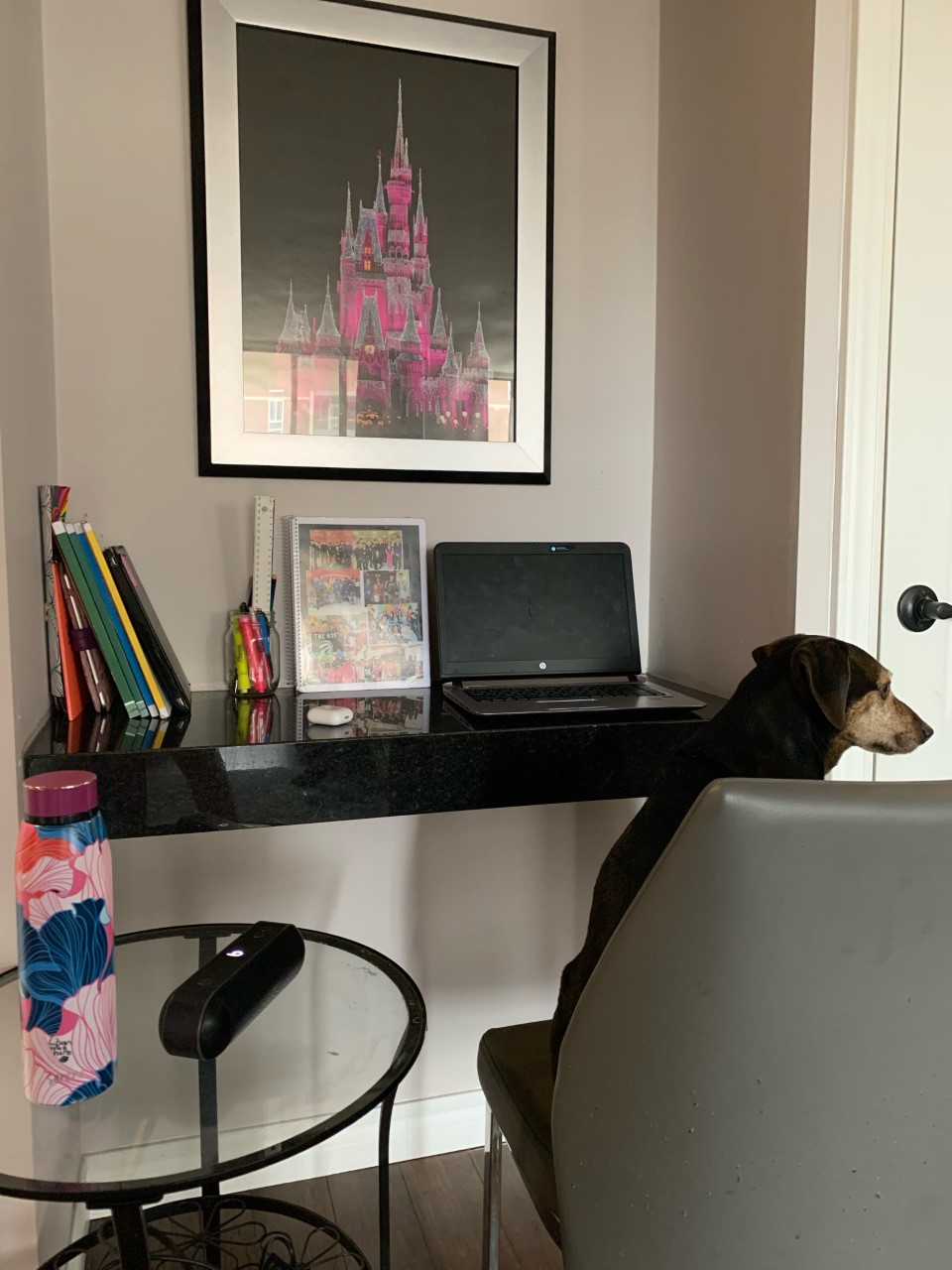
(My workspace with Milo)