Photo of Samantha Perrin

It’s OK to Scrap a Lesson

As teachers, we are obliged to make plans every day for every block we teach.  Planning ahead can make everyone’s life so much easier and it is a necessity for a well-run classroom.

In Teacher’s College, I recall the lesson plans we had to create, in painstaking detail, indicating what our learning objectives were, how we would prepare, motivate , teach, assess and evaluate our students, what materials we would need to make it all happen and how many minutes each activity would take from start to finish.

Because planning is such a big part of our daily lives, it is no wonder we may not feel comfortable scrapping our plans right in the middle of a lesson. I’ve got stories of lessons which were not my best that I’ve suddenly changed so that everyone is happier and more productive, but I’d like to share a recent experience where a student encouraged me to scrap my lesson for something better.

Last week, I read a lovely book to my class called, “Whoever You Are” written by Mem Fox. The story is simple but straightforward and the illustrations by Leslie Staub are magical with vibrant colours and beautiful, clear images. The story reads more like a poem as it reminds us that we are all different in what we may eat, how we dress, where we live, or how we write our languages, but that we all feel joy and pain the same way. It was a perfect book to read during Anti-Bullying week because of its gentle message celebrating cultural diversity.

When I finished reading, I prepared the students for a reader’s reflection by noting some of their comments and opinions on chart paper. Before long, the page was full and it was clear that they had nailed it with comments like, “we are all different AND we are all the same” and “we are all special for different reasons.” I was so happy with their ideas as they began writing in their journals using ideas from our long list.

After about 2 minutes, I interrupted the class, quite excited about an idea I had. I told them that what they had just collaborated on – the long page of comments and insight about the book – could in turn be made into our own book about ‘belonging’. Each student could take a section of the list, write it neatly on a page and make an illustration to go with it. Then we could make a cover, and ‘publish’ it for our school library. The students got excited about the idea while they listened and tried to work in their notebooks.

Then, one of my students asked simply, “Could we make the book now?” It took me a split second to make my decision. The energy started to rise as I made an effort to explain the notion of Carpe Diem (Seize the Day), while searching for the right paper for good copies and the students chose which section of the list they wanted to illustrate. After a brief ‘writers’ meeting’ to discuss criteria for the book, they all got down to work. I have quite a range of abilities and challenges in my Grade 3 class and they are not great at transitions, but on this afternoon, even with this sudden switch in gear, everyone was fully engaged and focussed on their task.

Although the book idea came from me, the idea to scrap my lesson and start working on the book right away came from a student. And he was right.

Photo of Lisa Taylor

Using Twitter in the Classroom

Sure, Twitter can be used to find out what Kim Kardashian had for lunch today, but it can also be used to connect classrooms, teachers, and school communities.

Today I am going to talk about connecting with your families and students through Twitter.

Twitter is a powerful tool if used properly. The first step is choosing a “handle” (or name) that isn’t already taken. Remember there is a limit of 140 characters in a tweet, so don’t make your name too long! You might also want to make your name somewhat generic and not directly related to the specific class/school you are at, as that may change next year! Go with something that is specific to you – @TaylorsClass @LearningRules @ClassroomFun @EduFun. Choose something that you can take with you to your next class, your next school, your next experience. It takes a lot of work to build followers and to develop a good collection of people to follow, you don’t want to have to start from scratch each year.

If your goal for this twitter account is just to post stuff to the parents and students in the class, it might be wise to make it a “disposable” account and make it specific to that class and year so you can change it up each year. You might wand a more specific handle: @TaylorGr2_2014 @learning2015 @gr2FI14 – again, be creative!

Once you have settled on a handle, you need to get followers. You don’t necessarily need lots of big name followers for this account – your goal is more to connect your classroom community, possibly connect to other classrooms, share what your class is doing with your school, board, and PLCs. You can do all of this by sharing our handle with those who you think would benefit from seeing the information you are sharing.

Before you tweet, double check the guidelines in your school board around posting student work, names, pictures, etc. Don’t post pics or names of students or their signed work without parent consent.

Even without pics of students, you can still share lots of valuable stuff on your twitter feed. You can tweet text explaining what you are doing, questions that parents might want to ask their kids about what they learned today, agenda messages, reminders, etc…..the list goes on!

Twitter can also be used to connect to famous people. We used to write letters to authors, but now we can tweet them! I have had students write stories in the style of Mo Willems and then we tweeted them to Mo (@MoWillems) and Pigeon (@The_Pigeon) for them to see what we had been working on! We sent Canadian Astronaut Chris Hadfield (@Cmdr_Hadfield) tweets from each of our grade 2 students the day he left space, thanking him for everything he did to educate and inform us while he was up there! Twitter really does make the world a lot smaller!

As a teacher, I have tweeted what my class is doing and it always feels great when parents, other teachers, admin, or anyone really, comments on what we are doing! We often share questions we have, the “I wonder” questions that come out of inquiry – Twitter is an excellent resource for expert knowledge.

If you decide to use Twitter in your classroom, make a point of tweeting at least once a day. Even it if is just to say that everyone is having fun today! I like to print pages that have 140 boxes and teach my kids to write “tweets” about their day and then I will type them in at the end of the period, day, etc. We also post those 140 box sheets on the wall on our “twitter feed” so other classes can see what we are up to!

Twitter seems to be sticking around. We might as well embrace it!

Photo of Samantha Perrin

Feedback in the Shape of a Tree

     Providing effective and timely feedback to students is a constant goal for a teacher, particularly when there seems to be so little time during the day. With a crew of 20+ students, it can be a challenge to find the time to sit down with each student and explain spelling and various goals targeted in writing. Often, we get really good at correcting the same errors over and over again without very much evidence of growth or improvement on the students’ part.
     For my grade 3 students, I like to use a quick and effective feedback tool someone shared with me long ago. It is fast, effective and easy for primary students to recognize and utilize.
     Here’s what I do on written work which has been either hand written or typed on the computer; as I read, I underline or circle common spelling errors or errors in syntax such as forgotten capital letters or periods. When I have finished reading the text, I choose a few spelling mistakes or goals that may be missing and write them, correctly, in a list on a corner of the student’s work. Any more than 2 – 4 items in the list can be overwhelming for a student, so I keep it short. Then, I draw a tree around the words so these corrections represent the area of growth for the student. On the page beside the tree, I make sure to write a response or a positive comment such as; “Good details!” or “great ideas!”, etc. When students write the next time, they can conveniently flip through preceeding pages in their journal to check the words in the trees.

Using this feedback strategy, students have a concrete example of how they can improve the content and syntax of their written work, and each time they write in their journal, they have a mini dictionary of some of the words or tips they can easily refer to. A tree is a simple, friendly image to use to offer student-specific feedback. I have found that this strategy encourages students to proofread their work before they submit it, helps  the ‘unlearning’ of some fossilized errors, and sets small, attainable goals for students to improve their writing.

Photo of Erin G

Six Word Memoirs – How Much Can Be Said With So Little

     There’s not a whole lot of positive things to be said about French à la carte, but something I have learned to appreciate this year is going into the different classrooms and seeing what other teachers are doing. My colleague, who is the Homeroom teacher of one of my French classes, is phenomenal on many fronts. Most of all, her depth of analysis and critical thinking means that her assignments are always creative and engaging, so much so that I find I’m almost wanting to do them myself.

     The other week, she showed me the latest. As part of her memoir unit, she had her students communicate the essence of their lives and characters into six word memoirs. Some of the examples she provided them with were the following:

“Author of so many unwritten books.”

“Yes, I still have Superman sheets…”

“Was a painting, now a mural.”

“My rise to fame went unnoticed.”

“Smart girl wants love, gets dog.”

     It was fascinating to see what the students were able to come up with themselves. Submitting a draft of their top six, it was amazing actually to see how they were able to incorporate wit, perspective and feeling into their descriptions. Most intriguing was matching up the words with the student and the insight it provided into their character. Finally, it was really interesting to see how effective they were as writers. They were much better at it than me. The right six words are not easy to come by – try it yourself…


Engaging Idea

A new year is an opportunity for introducing new routines or learning opportunities. If your routines are already established and your planning is complete, you may just want to add a new “twist” to the assignments, addressing different learning styles and increasing student engagement.

Depending on the age group that you teach, – receive infographics on a wide-range of topics at Daily Infographic, see http://dailyinfographic.com/. This is a great way to get comfortable with the use of infographics. View before sharing with students.  Infographics (information graphics) are all around us in subway maps, advertisements, and historical representations. They provide students with an alternative way to read information as well as present information. An infographic is a graphic visual representation. Larger amounts of data or information are presented in a visually appealing way that the reader is able to easily retain. Infographics can include timelines, maps, charts, graphs, illustrations or photographs, making them a useful and beneficial resource for social studies, math, language, science and art.

Suggestions for introducing or integrating infographics:

– receive infographics on a wide-range of topics at Daily Infographic, see http://dailyinfographic.com/. This is a great way to get comfortable with the use of infographics. View before sharing with students.

– in Google search a selected topic and “infographic” to find a reputable author/creator of an infographic that connects to your lesson or subject. Preview the infographic. Provide it to your students to read individually or have them discuss in small groups.

– use infographics for specific knowledge-building. For example, if studying First Nations treaties with the Canadian Government, a government produced infographic is provided at: http://www.aadnc-aandc.gc.ca/eng/1380223988016/1380224163492. This infographic provides factual information in an interesting format for students that is easy to understand.

– after using infographics and understanding the components that make them effective, have students create their own infographics. It could be their own life story, their community or outer space. It could replace the pamphlet idea for presenting information on another city, country, or issue.

– create a campaign against bullying (or address various social issues) using student created infographics modelled on a reputable resource such as the infographic at Stop Bullying Gov, see http://www.stopbullying.gov/image-gallery/what-you-need-to-know-infographic.html.

– students can design their own infographic with pencil or paper, or electronically with tools such as Infogr.am or Piktochart.


Enjoy introducing something new to your students for the New Year!

“I Know Here”

At one of our first staff meetings this year, we had a discussion about building community in our school. What is our community? How do we see ourselves? Many of the teachers had a difficult time describing our school community. We are in a building with additions that have been attached on various levels, resulting in doors and stairs that physically separate the classrooms into small groupings of three or four to a floor. The community outside of the school is also diverse. There are few apartment buildings as well as a neighbourhood of homes, a park, and a plaza of stores.

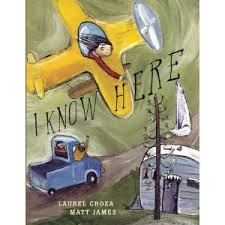
To discover our community through student inquiry, all the classes read the book I Know Here by Laurel Croza.


We then asked the students to take a similar approach and define their community with words and representations. The results were outstanding. Every age from Kindergarten to grade 8 was able to identify what made the community unique and they presented their own perspective. To extend that sense of our community defined by student voice, we set up a literacy night at the school to showcase the student work. It included descriptive writing, drawings, 3D representations, photos and videos.

The experience was rewarding for the teachers, students, and parents of our school community. The work was meaningful and the children were engaged. It was a topic that was accessible to all and promoted equity throughout our school. The children were also able to share new insight and point of view with us, the educators.

Literacy and Big Ideas

We started the first of our 4 big questions for the year. How do we balance our needs with the needs of others? The question has been on the wall since the second week of school, but only now are the students starting to find ways to answer that question. One of the ways the grade 5/6 students have started to approach the question is through their learning in Social Studies. As they learn about initial contact between Europeans and First Nations, they are also considering the needs of the explorers and settlers compared to the needs of the First Nations in Canada.

The other way that the students have broadened their understanding of the question is through read-alouds. One book in particular, Sees Behind Trees by Michael Dorris, was a favourite read-aloud to the class. It connected with our Social Studies learning as well as the model it provided for the descriptive writing we were experimenting with. At the end of the book, the students were eager to identify various relationships in the book and how the characters’ needs balanced with one another’s. Reading this book together seemed to click for everyone as a means of examining the big over-arching question.

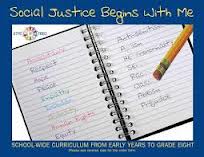
This was a celebrated moment of understanding in our classroom and a confirmation of my own that students need to be immersed in a literature-rich curriculum. One of the most useful resources I have found to support discussion and understanding is ETFO’s Social Justice Begins With Me. This resource provides a robust list of books that connect to themes/ideas of community, empathy, rights of the child, as well as big ideas of cycles or beauty! It summarizes the text and highlights themes that connect the students to the learning. I also like that there are sections of the resource specific to Primary, Junior, and Intermediate grades with curriculum connections and activity ideas.

You can also view parts of the resource in pdf at http://www.etfo.ca/resources/socialjustice/pages/default.aspx or look at specific booklists that have also been added to the site.

we made it

Celebrating Learning as the Year Winds Down

As our school year winds down, I thought I’d share a few ideas I’ve used in the past along with some I’ve recently come across that can create fun and meaningful opportunities to reflect on the learning and  overall experience in our classrooms this year.

END OF YEAR BOOKLET: This booklet is geared toward junior students but can easily be modified for primary grades.  This booklet is a way for students to think back on the various aspects of their year and includes tasks that involve creativity by adding artwork.  Students enjoy reading each others’ booklets and sharing them with the class at a year-end party.

END OF YEAR AWARD: Students create their own award to present to anyone they wish.  They decide what the award is celebrating and the recipient can be someone in the class, the school, their family, or community.  You can make it fun by having students draw each others’ names and create an award for their classmate which they present at an end-of-year award ceremony.  This often becomes very humourous with some silly awards being created.

TEACHER REPORT CARD: I can understand why some teachers would be wary of having their students do this but I actually find it very helpful and the students love giving me feedback.  I spend so much of the year assessing them and sharing descriptive feedback about their learning so why shouldn’t they do the same with respect to my teaching?  Students are quite insightful and honest.  Some of the reports I’ve received have been eye-openers and got me thinking about how to better my program the following year.

LETTER TO NEXT YEAR’S STUDENTS: This gives the current students the opportunity to reflect on their year and think of advice to give to the students for the upcoming school year.  Both the students writing the letter and those reading it the following year really enjoy this opportunity to get a sense of what can be expected.

LET STUDENTS TEACH A CLASS: You can split the class into groups and assign each a specific topic you studied this year. Give them time to go over their topic and invent a good review activity, which they have to grade (or not, if it’s too much for the end of the year). You assess them on whether they were able to re-teach the concept or skill and how effective their review activity is.

STUDENT CREATED QUIZ SHOW: Have students come up with questions for a quiz show about concepts, skills, facts, or anything they learned throughout the year.  Create categories (ie. like Jeopardy) for each subject area and have students organize their questions.  Enjoy the quiz show as a class competing against the teacher or form teams of students to compete against each other.  Prizes can include a longer recess, extra gym time, or some frozen treats at the end of hot June day.

end of year booklet part 1

end of year booklet part 2

end of year award

Teacher Report Card

letter to next year students

Work on writing board

Work on Writing

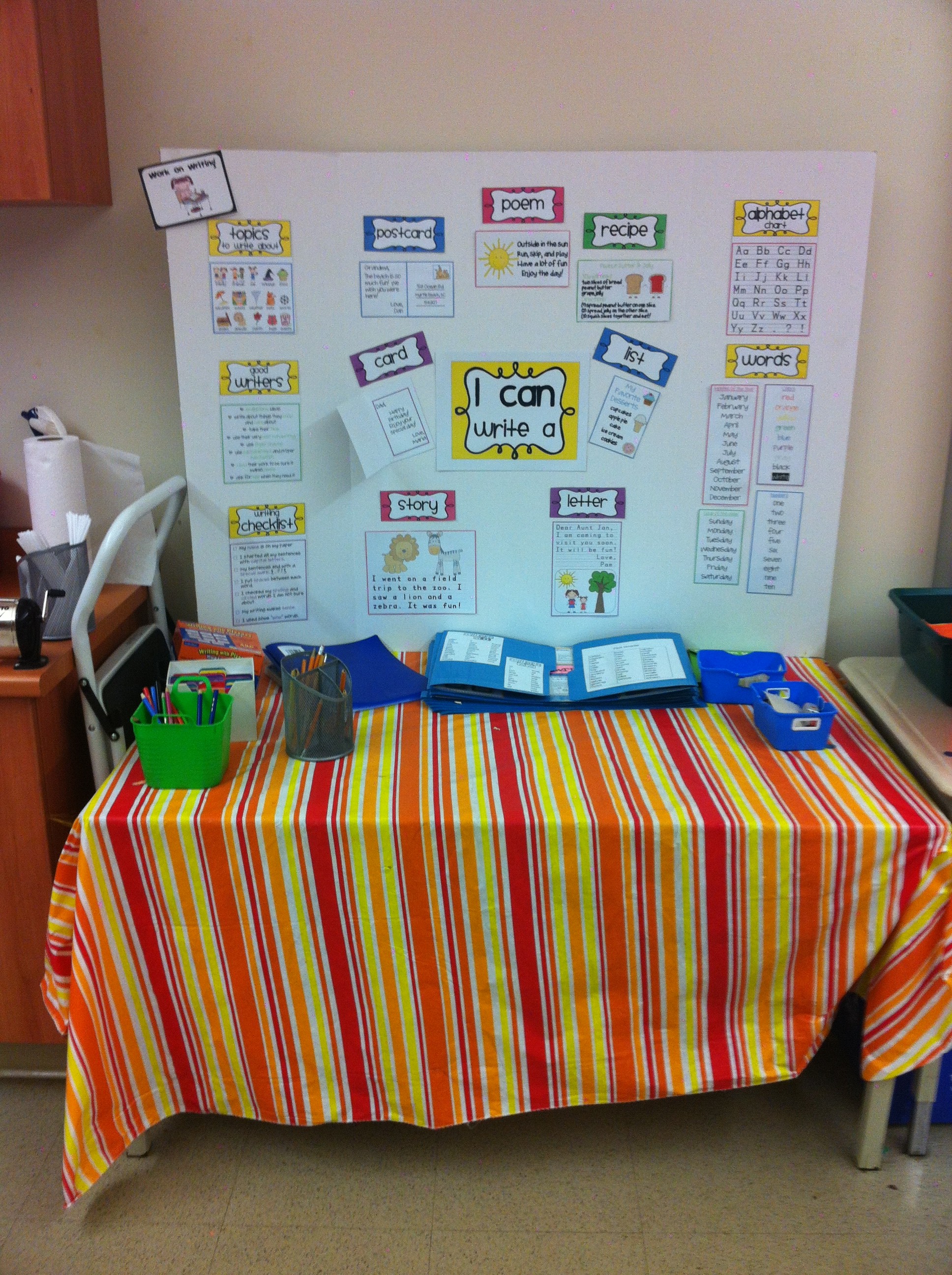
One of my colleagues does The Daily 5 in her classroom. In my Board, this is an initiative that we are all currently working towards. When I used the Daily 5 in my classroom, I sometimes found it hard to constantly keep my students engaged in the Work on Writing aspect of this program. After looking around her room, I just fell in love with her Work on Writing centre. In her class, she has a separate area for her Work on Writing. Students all choose which centres to go to for that day (choice is always important).

At her writing centre, she set up one of the three-fold bulletin boards, filled with information about different types of texts, and some examples of what students could write about for each text type (i.e. letter, story, etc). This is a great idea for students as they can be immersed in their writing, and THEY can choose what to write about using whatever text type they choose. Below I have included a picture for you to observe (and perhaps steal) for your own classroom if you wish!

Photo of Tina Ginglo

Timely Effective Feedback with Comic Building Website

I recently created an account on Bitstrips for Schools.  Bitstrips is a free website where students can create comics or other graphic texts.  Creating an account is easy.  Bitstrips provides you with an access code that you share with your students.  Students simply log in with the access code and they immediately have access to the different activities you create.   Their first task (and yours) is to create an avatar.  Students can then begin to work on the activities you create.

My Avatar

My initial activity was an introductory activity where students were asked to create a comic introducing themselves to the class.  The learning goal for this activity was for students to become familiar with the comic building tools.   After a week of in class work, Bitstrips is now an activity students have an option to go to when other work has been completed or they can work on activities from their home computers. Now, most of my students are completing the graphic text activities at home for ‘homework’.   Parents appreciate that their children are using the Internet to complete school activities rather than to play games and watch videos on YouTube.

A quick and simple activity to help students become familiar with the tools.


What I appreciate most about this website is that all students, regardless of abilities, can navigate the tools and create a piece of writing. Once students complete an activity, it must be submitted to me for review before it can be published.  I can access student writing from anywhere; smart phone, tablet, at home, or school and I can give them timely specific feedback on their written submission.   I am using Bitstrips to reinforce punctuation and spelling with my third grade students.  I spend a few minutes each evening sending students feedback on their submissions.   The next time students log in to Bitstrips they will see my feedback and they can immediately edit and/or revise their work and resend it to me for another review.


Below are some sample comments I have submitted to students:

Hi Charlie, 

This is a fun comic! Please make sure you begin each sentence with a capital and end with a period.

Hi Krisandrew,

I really like how you ended your comic! I am impressed with all your slides. Please review for punctuation. For example, sentences must begin with a capital. Example “Me too.” You missed a period in one of your thought bubbles. It is movies not movie. Otherwise, great effort! Please correct and resubmit.

Below are two activities I have assigned on Bitstrips.com:

 Turning Narratives Into Graphic Texts

You are to select one of your personal narratives and create a Bitstrip.

You are to use speech bubbles for your dialogue sentences.
You are to use thought bubbles for your thinking and feeling sentences.
You are to use captions for your action sentences.

Your bitstrip should meet the success criteria for personal narratives!

Silly Story Comic

 You are to write a silly story!

You are to use the success criteria for a personal narrative. That is,
-Action, dialogue and thought sentences;
-Beginning, Middle and End;
-Correct punctuation and spelling;

But your story must also include the characteristics of a silly story:

-Strange and impossible events take place;
– Characters act as if everything is normal;
-You leave the reader with a smile on their face.

Your story should be a at least 5 frames long.
Dialogue sentences must be in speech bubbles.
Thinking/Feeling sentences are in thought bubbles.
Action sentences must be in captions a the top or bottom of the frame.

I am fortunate to have unlimited access to computers throughout the school day, but you can do this in a one computer classroom.  As I mentioned in a prior blog post, it is important to know what access your students have to the Internet from home before you encourage Bitstrips as a homework activity.  Bitstrips has helped me engage students in the writing process.  It forces them pay attention to writing conventions and it provides me with a manageable way to provide timely feedback to students.